

Table of Contents
1. Introduction
Remote work has become the new normal for businesses worldwide, and effective communication is at the heart of keeping distributed teams connected. Without the right tools, collaboration can quickly turn into chaos like missed messages, scattered files, and endless email threads. That’s where modern communication platforms like Slack and Discord come in.
Both tools have gained popularity among remote teams, but they were designed with slightly different audiences in mind. Slack is widely seen as a business-first communication platform, offering structured channels, integrations, and workflow automation. Discord, on the other hand, started as a platform for gamers but has evolved into a powerful team collaboration tool with strong voice and video communication features.
This blog explores the key differences between Slack vs Discord, highlighting their features, pricing, and usability to help you determine the best communication tool for remote teams.
2. Why Communication Tools Matter for Remote Teams
Communication is more than just sending messages, it’s about building connections, sharing knowledge, and keeping everyone aligned toward the same goals. In a physical office, teams can rely on face-to-face conversations, quick desk chats, or meetings to stay in sync. But in a remote setup, everything depends on the tools used to bridge the distance.
The right platform can:
- Improve productivity by keeping conversations organized.
- Enhance collaboration with file sharing, integrations, and task management.
- Boost team culture through casual chat spaces, video calls, and community-like environments.
- Reduce miscommunication with searchable archives and real-time updates.
That’s why choosing between Slack and Discord is more than just picking a messaging app, it’s about selecting the foundation for how your remote team communicates, collaborates, and grows.
3. Overview: Slack vs Discord
Slack has become one of the most widely used communication tools for businesses and remote teams. Launched in 2013, it was built with workplace collaboration in mind, and today it serves millions of professionals worldwide.
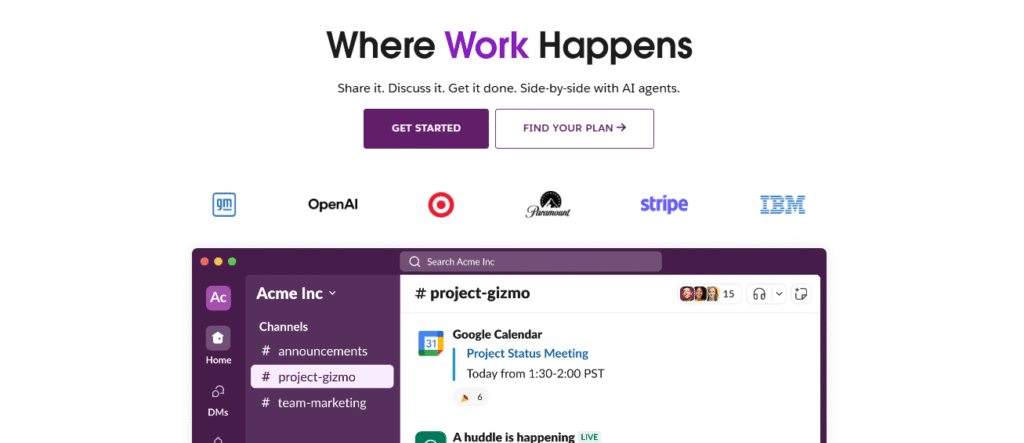
Slack organizes communication into structured channels, making it easy for teams to keep discussions on topic and avoid scattered conversations. With its strong focus on integrations and productivity, it has established itself as a go-to solution for remote work. Visit Slack offical site
while discord on the other hand, started in 2015 as a platform designed for gamers to connect via voice, text, and video. However, over the years, it has grown far beyond gaming and is now widely used by communities, startups, and even remote teams.

Its strength lies in real-time communication, particularly voice and video, making it a great choice for teams that prioritize quick collaboration over formal structure. Unlike Slack, which feels more business-oriented, Discord offers a casual and community-driven approach to communication. Visit Discord Official site
4. Key Comparisons: Slack vs Discord
Both Slack and Discord are powerful communication tools, but they cater to different needs. Below is a side-by-side comparison of their core features to help remote teams decide which is the better fit.
| Category | Slack | Discord |
|---|---|---|
| User Interface & Ease of Use | Professional, business-focused design with structured channels and threads. | Casual, community-oriented design with servers and channels. Easier for informal use. |
| Team Collaboration & Productivity | Strong project management support with app integrations (Trello, Asana, Google Workspace, etc.). | Collaboration mainly through text, voice, and video. Fewer productivity-focused integrations. |
| Voice & Video Communication | Offers video calls and huddles, but limited in the free plan. | Superior real-time voice and video features, including screen sharing and streaming. |
| Integrations & Bots | Over 2,500 integrations with productivity apps and workflow automation tools. | Fewer integrations, but supports bots for automation, reminders, and moderation. |
| File Sharing | Easy file sharing with searchable archives. Larger file size support (up to 1GB on paid plans). | File uploads capped at 8MB (free) or 500MB with Nitro. No advanced archive search like Slack. |
| Search & Message History | Searchable archive of past conversations (limited to 90 days on free plan, unlimited on paid). | Unlimited message history, even on the free plan, but less advanced search features. |
| Security & Privacy | Enterprise-grade security with encryption, SSO, and compliance certifications. Best for businesses handling sensitive data. | Standard encryption for voice/text. Less advanced compliance/security features compared to Slack. |
| Pricing | Free plan limited, Pro ($8.75/user/month), Business+ ($18/user/month), Enterprise custom. | Generous free plan with unlimited history. Nitro Basic ($2.99/month) and Nitro ($9.99/month). |
| Best For | Professional teams, large organizations, and businesses needing structured workflows and integrations. | Startups, creative teams, and communities that value real-time voice/video and casual collaboration. |
5. Pricing Breakdown: Slack vs Discord
Pricing often plays a big role in choosing the right communication tool, especially for remote teams that need to balance features with budget. Here’s a breakdown of how Slack and Discord compare when it comes to cost.
5.1 Slack Pricing
Slack follows a per-user, per-month pricing model, which can get expensive as teams grow:
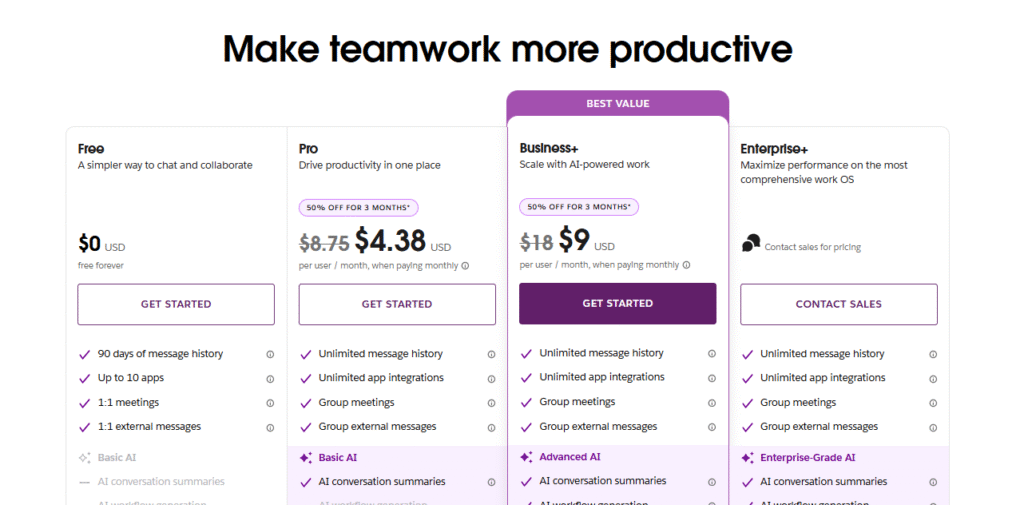
- Free Plan – Limited to 90-day message history and 10 app integrations.
- Pro Plan ($8.75 per user/month) – Unlocks unlimited message history, advanced integrations, and group video calls.
- Business+ Plan ($15 per user/month) – Adds enterprise-grade features like SSO, compliance, and priority support.
- Enterprise Grid (Custom pricing) – Tailored for very large organizations.
5.2 Discord Pricing
Discord is much more affordable, with a generous free plan and optional paid upgrades:
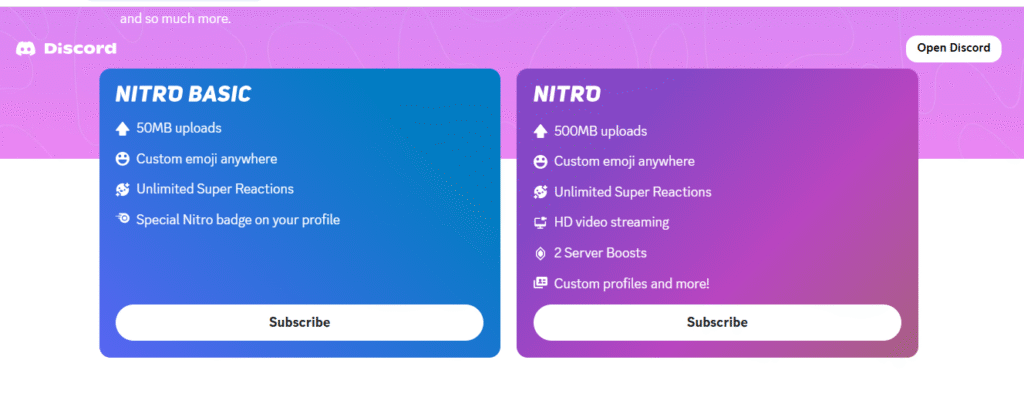
- Free Plan – Unlimited message history, voice channels, and video calls. File upload limited to 8MB.
- Nitro Basic ($2.99/month per user) – Increases file uploads to 50MB, adds custom emojis.
- Nitro ($9.99/month per user) – Boosts uploads to 500MB, HD video, and additional server features.
5.3 Which is More Cost-Effective?
- Slack → Best for mid to large teams that need advanced integrations, structured workflows, and enterprise security. Worth the cost if productivity tools are essential.
- Discord → Best for small or budget-conscious teams that value real-time voice/video and casual communication over strict structure.
6. Pros and Cons of Slack vs Discord
| Tool | Pros | Cons |
|---|---|---|
| Slack | – Professional and business-oriented interface – Organized communication with channels and threads – Powerful integrations with 2,500+ apps – Strong security and compliance (SSO, enterprise-grade encryption) – Great for workflow automation | – Free plan limited (90-day history, fewer integrations) – Pricing can be expensive for large teams – Can feel overwhelming with too many channels/notifications |
| Discord | – Generous free plan with unlimited message history – Superior voice and video communication – Always-on voice channels (great for team culture) – Affordable paid options (Nitro) – Flexible server setup for communities or teams | – Less professional look compared to Slack – Limited business integrations and productivity tools – File upload limits (8MB free, 500MB Nitro) – Fewer enterprise security and compliance features |
7. Which Tool is Best for Remote Teams?
Choosing between Slack and Discord depends on your team’s size, goals, and work style. Both platforms are excellent for communication, but each is tailored to different types of remote teams.
7.1 Best for Small Teams and Startups
If you’re running a small team or early-stage startup, Discord is often the better choice. Its free plan is generous, offering unlimited message history, voice channels, and video chat without added costs. The casual setup makes it easy to stay connected without being weighed down by overly complex features. Plus, the real-time voice channels can simulate the feeling of a shared office environment, which helps build team culture.
7.2 Best for Large Organizations
For larger teams and enterprises, Slack is the clear winner. Its integrations with business apps, advanced security features, and structured channels make it ideal for handling complex workflows. Slack’s compliance certifications and enterprise-level tools also ensure sensitive data is protected, which is critical for big companies.
7.3 Best for Creative and Community-Driven Teams
If your team thrives on brainstorming, collaboration, or building a community-like environment, Discord shines. Features like always-on voice channels, streaming, and casual chat spaces help foster creativity and engagement. This is why many creative professionals, educators, and online communities prefer Discord.
7.4 Best for Productivity-Focused Remote Teams
If your team’s primary goal is to improve productivity and workflow efficiency, Slack is the more reliable tool. With task management integrations, searchable archives, and automation workflows, it’s built to help teams stay organized and efficient.
8. Wrap-Up
Thanks for sticking with me through this “Slack vs Discord: Best Communication Tool for Remote Teams” breakdown! At the end of the day, both platforms bring unique strengths to the table, Slack’s structured workflows and enterprise security versus Discord’s real-time communication and community-friendly vibe. You really can’t go wrong, just choose the one that aligns best with your team’s style and needs.
Further Reading You’ll Love
If you’re curious to explore more insightful comparisons, check out these recent posts from Platform Adviser:
- Circle vs Skool: Which Is the Best Platform for Paid Communities? — A take on building and monetizing memberships with community-first platforms.
- Document360 vs HelpDocs: Best Knowledge Base for SaaS Teams — Compare usability, integrations, pricing and more to find the right fit for your documentation needs.
- Scribe vs Tango Comparison: Best for Auto-Generating SOPs with AI — Discover which AI tool excels at turning workflows into ready-to-use guides.
- Dorik vs Carrd: Best Lightweight Landing Page Builder in 2025 — A look at two sleek builders for quick, effective online pages.
- Refiner vs AskNicely: Niche Tools for SaaS Customer Feedback — Dive into tools that help streamline feedback loops and improve customer experience.



I do agree with all the ideas you have introduced on your post They are very convincing and will definitely work Still the posts are very short for newbies May just you please prolong them a little from subsequent time Thank you for the post
Fantastic beat I would like to apprentice while you amend your web site how could i subscribe for a blog site The account helped me a acceptable deal I had been a little bit acquainted of this your broadcast offered bright clear concept
Your blog is a treasure trove of knowledge! I’m constantly amazed by the depth of your insights and the clarity of your writing. Keep up the phenomenal work!
Nice blog here Also your site loads up very fast What host are you using Can I get your affiliate link to your host I wish my site loaded up as quickly as yours lol
Fantastic beat I would like to apprentice while you amend your web site how could i subscribe for a blog site The account helped me a acceptable deal I had been a little bit acquainted of this your broadcast offered bright clear concept
obviously like your website but you need to test the spelling on quite a few of your posts Several of them are rife with spelling problems and I to find it very troublesome to inform the reality on the other hand Ill certainly come back again
Your blog is a beacon of light in the often murky waters of online content. Your thoughtful analysis and insightful commentary never fail to leave a lasting impression. Keep up the amazing work!
Simply wish to say your article is as amazing The clearness in your post is just nice and i could assume youre an expert on this subject Well with your permission let me to grab your feed to keep updated with forthcoming post Thanks a million and please carry on the gratifying work
Pingback: Coda vs Quip: Best Document Collaboration Tool for Businesses
Somebody essentially help to make significantly articles Id state This is the first time I frequented your web page and up to now I surprised with the research you made to make this actual post incredible Fantastic job